Tooling for converting, valiating, and parsing OpenAPI, Swagger, and Postman API definitions





## Installation
```bash
npm install oas-normalize
```
## Usage
```javascript
import OASNormalize from 'oas-normalize';
// const { default: OASNormalize } = require('oas-normalize'); // If you're using CJS.
const oas = new OASNormalize(
'https://raw.githubusercontent.com/OAI/OpenAPI-Specification/master/examples/v3.0/petstore-expanded.yaml'
// ...or a string, path, JSON blob, whatever you've got.
);
oas
.validate()
.then(definition => {
// Definition will always be JSON, and valid.
console.log(definition);
})
.catch(err => {
console.log(err);
});
```
### `#bundle()`
> **Note**
>
> Because Postman collections don't support `$ref` pointers, this method will automatically upconvert a Postman collection to OpenAPI if supplied one.
Bundle up the given API definition, resolving any external `$ref` pointers in the process.
```js
await oas.bundle().then(definition => {
console.log(definition);
});
```
### `#deref()`
> **Note**
>
> Because Postman collections don't support `$ref` pointers, this method will automatically upconvert a Postman collection to OpenAPI if supplied one.
Dereference the given API definition, resolving all `$ref` pointers in the process.
```js
await oas.deref().then(definition => {
console.log(definition);
});
```
### `#validate({ convertToLatest?: boolean })`
Validate and optionally convert to OpenAPI, a given API definition. This supports Swagger 2.0, OpenAPI 3.x API definitions as well as Postman 2.x collections.
Please note that if you've supplied a Postman collection to the library it will **always** be converted to OpenAPI, using [@readme/postman-to-openapi](https://npm.im/@readme/postman-to-openapi), and we will only validate resulting OpenAPI definition.
```js
await oas.validate().then(definition => {
console.log(definition);
});
```
#### Options
| Option | Type | Description |
| :--- | :--- | :--- |
| `convertToLatest` | Boolean | By default `#validate` will not upconvert Swagger API definitions to OpenAPI so if you wish for this to happen, supply `true`. |
#### Error Handling
For validation errors, when available, you'll get back an object:
```js
{
"details": [
// Ajv pathing errors. For example:
/* {
"instancePath": "/components/securitySchemes/tlsAuth",
"schemaPath": "#/properties/securitySchemes/patternProperties/%5E%5Ba-zA-Z0-9%5C.%5C-_%5D%2B%24/oneOf",
"keyword": "oneOf",
"params": { "passingSchemas": null },
"message": "must match exactly one schema in oneOf"
}, */
]
}
```
`message` is almost always there, but `path` is less dependable.
### `#version()`
Load and retrieve version information about a supplied API definition.
```js
await oas.version().then(({ specification, version }) => {
console.log(specification); // openapi
console.log(version); // 3.1.0
});
```
### Options
##### Enable local paths
For security reasons, you need to opt into allowing fetching by a local path. To enable it supply the `enablePaths` option to the class instance:
```js
const oas = new OASNormalize('./petstore.json', { enablePaths: true });
```
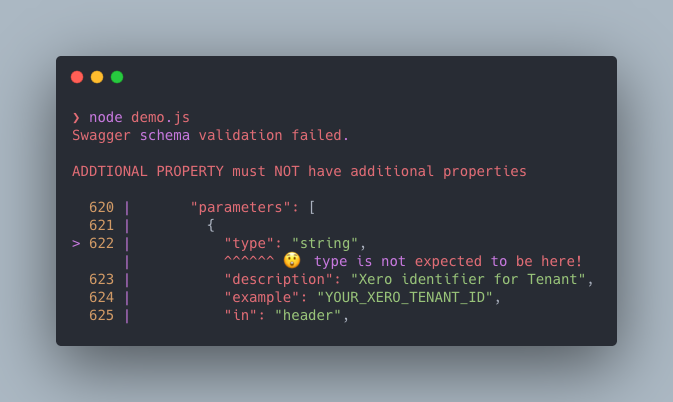
##### Colorized errors
If you wish errors from `.validate()` to be styled and colorized, supply `colorizeErrors: true` to your instance of `OASNormalize`:
```js
const oas = new OASNormalize('https://example.com/petstore.json', {
colorizeErrors: true,
});
```
Error messages will look like such: